For architecture & engineering
Time tracking that keeps every project phase inside its fee
Long projects, fixed fees and many hands on each phase. LockedHours tracks time by project and task, shows how much of each fee is used, and warns the project lead before a phase runs over.
- No card needed
- $6 per seat, locked
- Bring your history
What gets easier
Built for the way architecture & engineering work
Fees that run out mid-phase
Budgets per project in hours or money, with an alert at the threshold you choose.
Timesheets that get done
A weekly grid for people who log time on Friday, and a timer for everyone else.
Phases as tasks
Use tasks for phases (concept, design development, documentation) and report on each.
Setup
A typical practice setup
Projects per client, tasks for each phase, and fees with budgets.
- Clients, projects and tasks in minutes
- Or bring them across from Harvest
- Budgets that fit each kind of work
- Fixed fee
Library renovation
Oakridge Public Library
Budget $120,00062% - Time & materials
Clinic fit-out
Meridian Health Partners
Budget 900 h81% - Fixed fee
Flagship store
Harbor & Pine Outfitters
Budget 480 h47%
Project view
Hours by phase and by person
Open any project to see its budget and where the hours went, by task and by person.
- Budget used and remaining
- Hours by task (phase)
- Hours by person
Timesheets
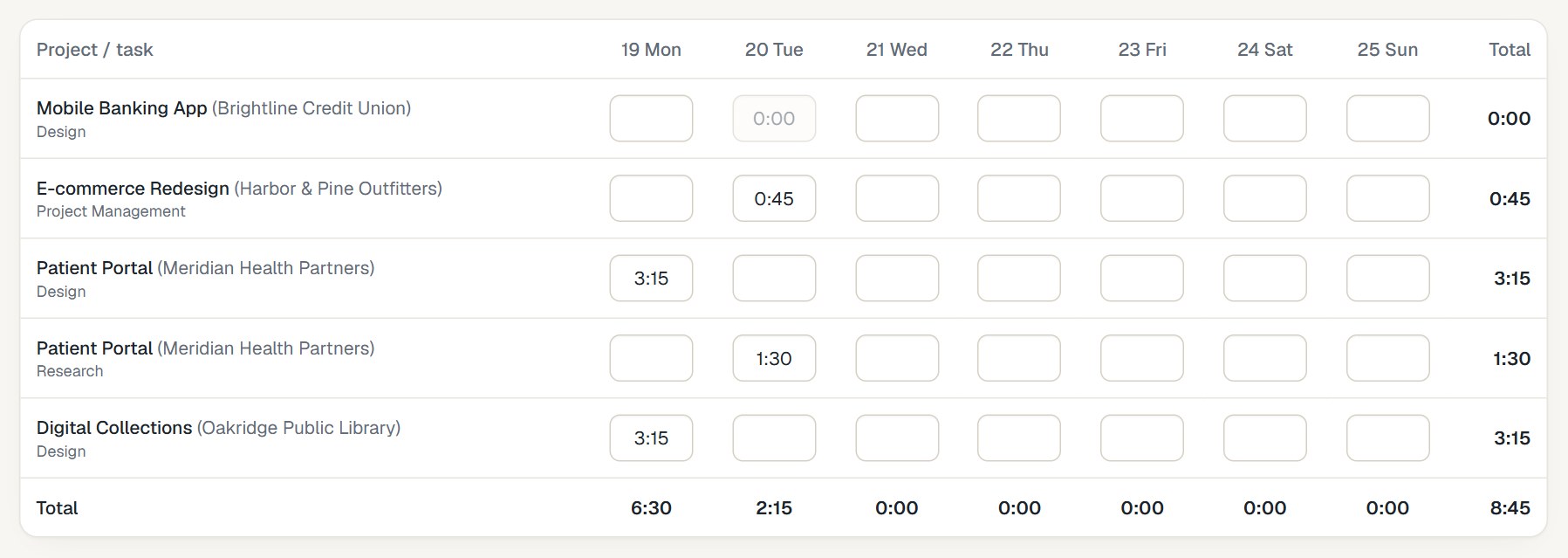
A week of work in one grid
Projects and phases down the side, days across the top. Type the hours and press Enter.
- Totals per day and week
- Invoiced hours lock
- Works on phones
How it fits together
From the first hour to a paid invoice
- 1
Track
Timer or timesheet, on any device.
- 2
Review
Budgets and reports update as you go.
- 3
Bill
Uninvoiced hours become an invoice.
- 4
Understand
See what each project really earned.
Questions from architecture & engineering
Something else? Email us. We aim to reply within 2 business days.
Features to look at
Guides
Can we track time by project phase?
Yes. Create a task for each phase and assign the tasks to the project; reports group by task.
Can we bill a fixed fee in stages?
You can create invoices with any lines, including a percentage of the fee, and record payments as they arrive.
Is there resource scheduling?
Not yet. Today LockedHours covers time, budgets, invoices and reports.