Invoice numbering: formats, next number and gaps
Invoices are numbered when they're issued, one after another without gaps, in the format you choose. Credit notes have their own series.
Who can do this: AdminsUpdated · 2 min read
Set the format
Step 1: Go to Settings and find Numbering.
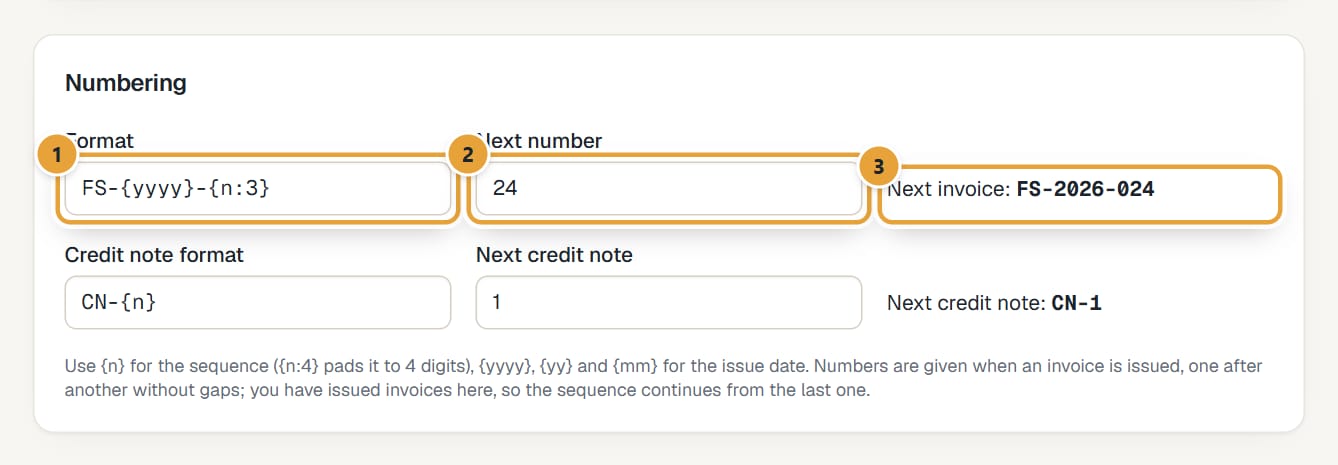 (opens the full-size image)
Step 2: Type the Format. Use {n} for the number, {n:4} to pad it to 4 digits (0042), {yyyy} or {yy} for the year and {mm} for the month of the issue date. Anything else is printed as it is.
Examples: {n} → 42; INV-{n:4} → INV-0042; {yyyy}-{n:3} → 2026-042. The Next invoice preview shows the result.
Step 3: Set Next number if you're continuing a sequence from another tool.
Step 4: Do the same for Credit note format and Next credit note (CN-{n} by default).
Step 5: Click Save settings.
How numbering works
- Drafts have no number. The number is given when you issue the invoice (send it, or Issue without emailing).
- Numbers go one after another without gaps, and issue dates can't go backwards.
- Once LockedHours has issued an invoice, Next number becomes read-only: the sequence continues from the last one issued.
- Credit notes have their own series and counter.
- If you imported from Harvest, Next number was set to continue after your most recent Harvest invoice, and, if the Format was still the default {n} and you hadn't issued invoices in LockedHours, the format is copied from that invoice: 2025-0008 gives {yyyy}-{n:4} (next: 2025-0009), INV-104 gives INV-{n} (next: INV-105), 42 stays {n} (next: 43). A format you had already changed is kept. The finished import page says Invoice numbers continue from … as …. Imported invoices keep their Harvest numbers.
Common problems
"Another invoice already has the number …"
The format and next number produce a number an existing invoice has. Change the format (for example, add a prefix), or ask us if the sequence is locked.
Didn’t find what you needed?
Ask in Help inside the app, or email [email protected]. We aim to reply within 2 business days.